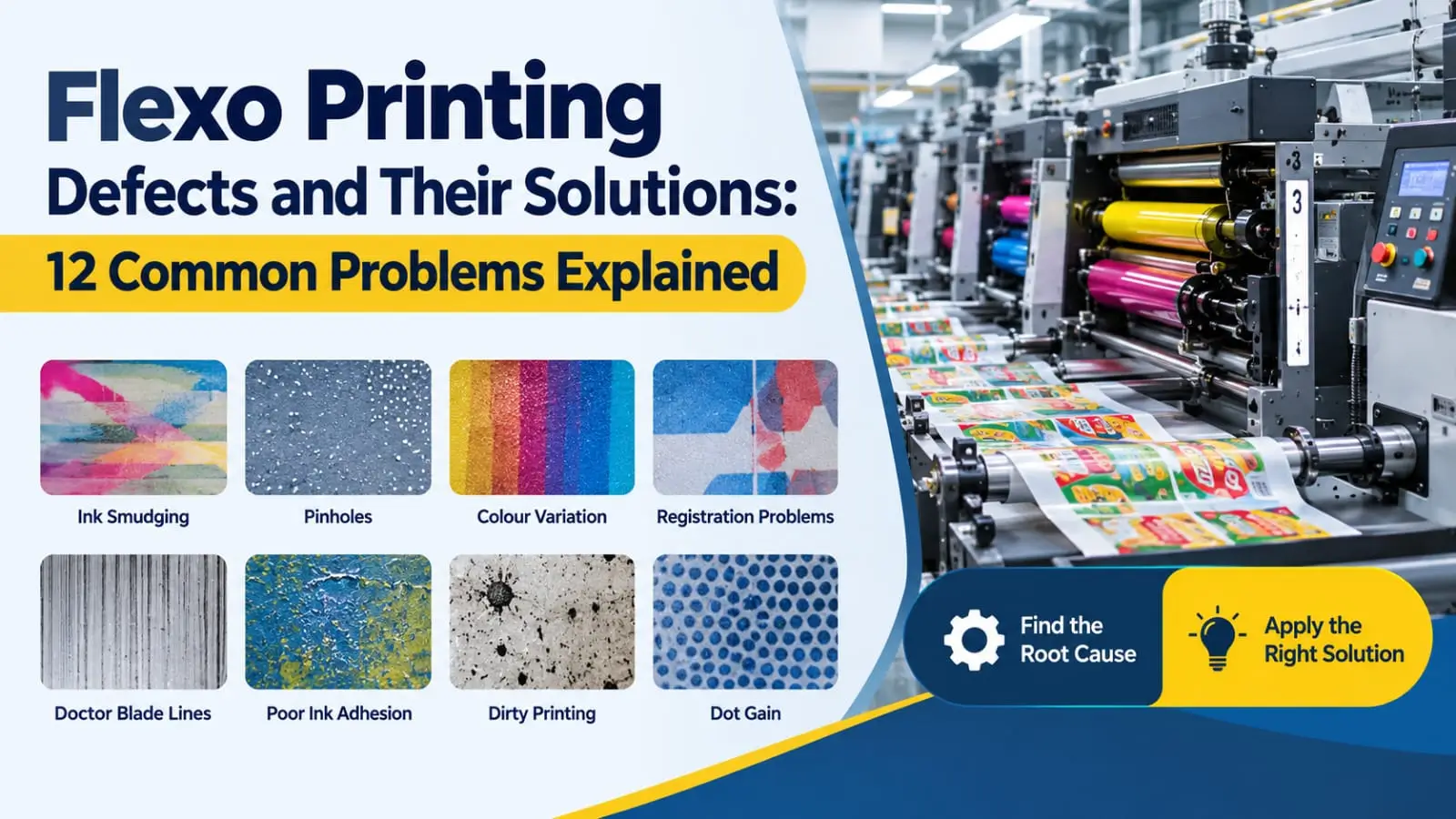
Flexographic printing is widely used in flexible packaging for printing on BOPP, PET, LDPE, PE, and other packaging films. It offers high production speeds, good print quality, and efficient operation. However, even a well-maintained flexo printing machine can develop quality problems during production.
Common flexo printing defects include ink smudging, pinholes, colour variation, poor ink adhesion, registration errors, and doctor blade lines. These issues can increase material waste, cause customer complaints, and reduce production efficiency.
The good news is that most printing defects can be controlled by identifying their root causes and applying the correct corrective actions.
In this guide, we will discuss 12 common Flexo printing problems, their causes, and practical solutions for printing operators and quality control professionals.
1. Ink Smudging and Poor Drying
Causes
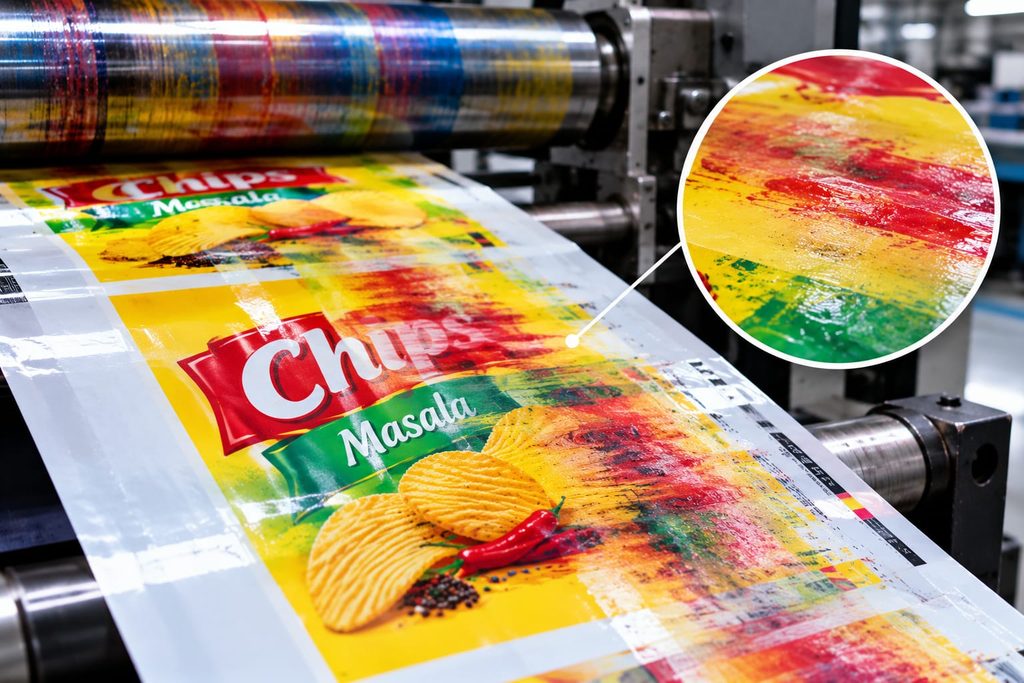
Ink smudging occurs when the printed ink does not dry or cure sufficiently before contacting rollers or the next printing unit. Common causes include insufficient drying capacity, an unsuitable solvent blend, excessive ink film thickness, and high machine speed.
Solutions
- Check the drying temperature and airflow.
- Verify that the ink and solvent blend are suitable for the application.
- Check ink viscosity and avoid excessive ink transfer.
- Confirm that the drying system is operating correctly.
- Adjust machine speed when the drying capacity cannot keep up.
For water-based inks, also monitor pH and other ink-supplier specifications. For UV inks, verify the curing system and lamp performance.
Quality tip:
Do not increase the dryer temperature blindly. Excessive heat can distort plastic films or create other process problems.
2. Pinholes in Solid Printing
Causes
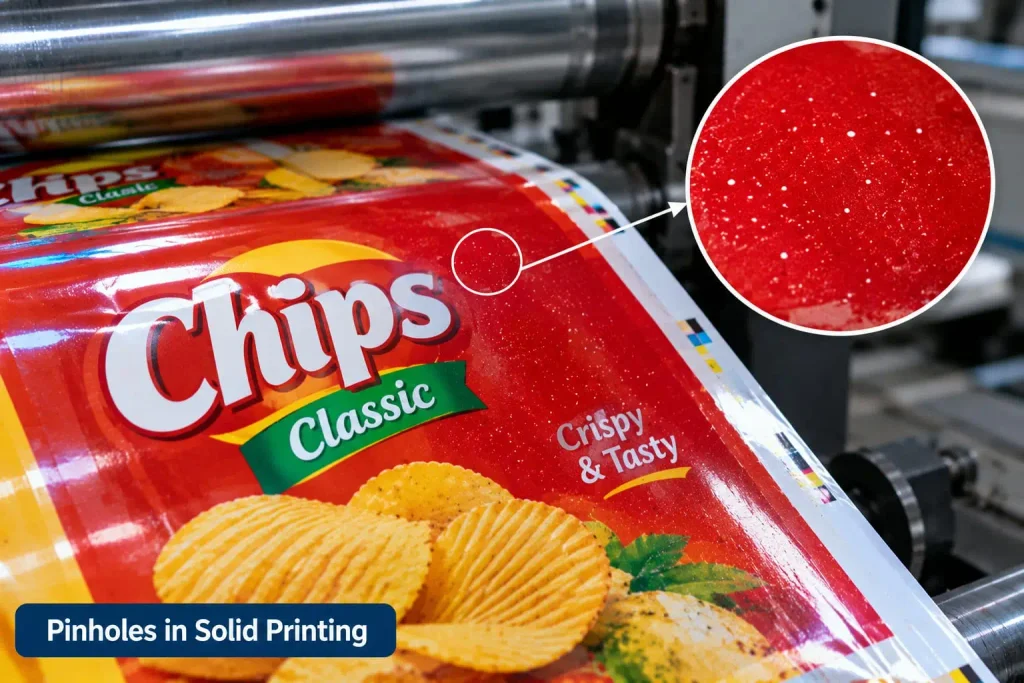
Pinholes are tiny unprinted spots that appear inside a solid printed area. They can make the print look uneven and reduce visual quality.
Typical causes include dust, contamination, poor substrate wetting, inadequate ink transfer, and surface irregularities.
Solutions
- Clean the film path, printing plate, and relevant machine components.
- Check the substrate surface for contamination.
- Inspect the anilox roller for dried ink or blocked cells.
- Verify that the ink is compatible with the substrate.
- Check corona treatment where required.
- Confirm that the plate-to-substrate impression is correct.
Avoid increasing pressure excessively, as this can create additional defects.
3. Color Variation During Production
Causes
Colour variation occurs when the printed shade changes during a job or differs from the approved sample.
Possible causes include changing ink viscosity, inconsistent ink mixing, temperature fluctuations, contaminated ink, incorrect ink transfer, and differences between substrate batches.
Solutions
- Measure and record ink viscosity at defined intervals.
- Maintain consistent ink mixing and circulation.
- Compare printed samples using a spectrophotometer.
- Monitor Delta E against the agreed customer tolerance.
- Check the anilox roller and impression settings.
- Verify the substrate and ink batch before making adjustments.
A standard colour-control procedure helps maintain consistency between production runs.
4. Registration Problems
Causes
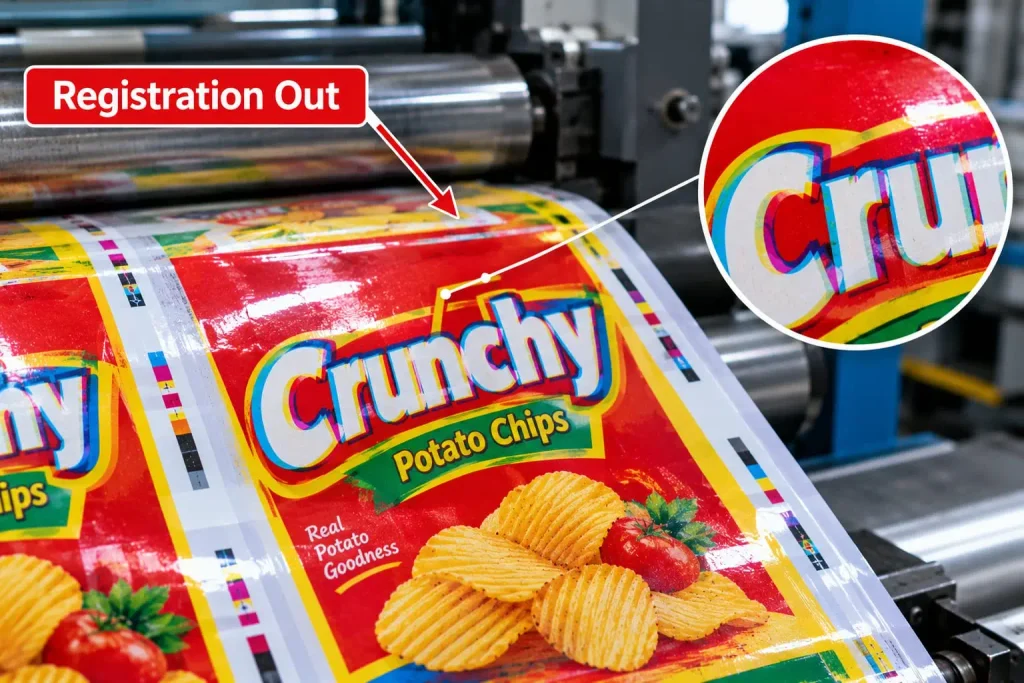
Registration problems occur when different colours do not align correctly. The result may be blurred text, coloured edges, or a double-image effect.
Common causes include incorrect register settings, unstable web tension, plate mounting errors, substrate stretching, and mechanical problems.
Solutions
- Check the plate mounting and register marks.
- Maintain stable web tension.
- Inspect the substrate for dimensional instability.
- Check the register-control system.
- Inspect cylinders, sleeves, and drive components if the problem persists.
Make small, controlled adjustments rather than changing several parameters simultaneously.
5. Doctor Blade Lines and Streaks
Causes
Doctor blade lines appear as continuous lines running through the printed image. They may result from a damaged blade, particles trapped under the blade, dried ink, or damage to the anilox roller.
Solutions
- Stop the press safely and inspect the doctor blade.
- Replace a damaged or worn blade.
- Check the anilox roller for scoring or surface damage.
- Clean the chamber and ink circulation system.
- Use appropriate ink filtration.
- Verify correct blade alignment and pressure.
Excessive doctor blade pressure can accelerate wear and damage the anilox roller. Follow the machine and blade manufacturer's recommendations.
6. Poor Ink Adhesion
Causes
Poor ink adhesion occurs when the ink can be rubbed, scratched, or peeled from the printed film. This is especially important in flexible packaging because printing quality must remain acceptable through subsequent converting operations.
Possible causes include insufficient surface treatment, unsuitable ink chemistry, contamination, and poor substrate compatibility.
Solutions
- Check the film's surface treatment and dyne level where applicable.
- Verify that the ink is designed for the specific substrate.
- Conduct an appropriate ink adhesion test.
- Inspect the film for contamination.
- Confirm that drying or curing is sufficient.
- Consult the ink supplier if adhesion remains poor.
A dyne test alone does not guarantee good ink adhesion. Actual performance should be confirmed through suitable testing.
7. Dirty Printing and Ink Contamination
Causes
Dirty printing occurs when unwanted marks, spots, or ink deposits appear in the printed image or non-printing areas.
Dust, dried ink, damaged plates, contaminated ink, and poor housekeeping can contribute to this problem.
Solutions
- Clean printing plates and cylinders regularly.
- Keep ink containers covered when not in use.
- Inspect the ink pump, hoses, and chamber.
- Filter ink when appropriate for the ink system.
- Maintain good housekeeping around the printing machine.
- Check plate relief and condition.
Regular cleaning between jobs also reduces the risk of colour contamination.
8. Excessive Ink Transfer and Filling In
Causes
Filling in occurs when ink spreads into areas that should remain open, such as small text, fine lines, and halftone spaces.
This can happen because of excessive ink transfer, an unsuitable anilox volume, high impression pressure, or incorrect ink properties.
Solutions
- Check the anilox roller specification.
- Reduce excessive plate-to-substrate impression.
- Verify ink viscosity and drying behaviour.
- Inspect the printing plate and its relief.
- Confirm that the artwork and screening are suitable for flexographic printing.
The objective is to transfer enough ink for good coverage without filling fine details.
9. Weak Print Density
Causes
Weak print density occurs when solid colours look faded or lack the required strength.
Possible causes include blocked anilox cells, insufficient ink transfer, unsuitable ink strength, incorrect viscosity, or inadequate impression.
Solutions
- Inspect and clean the anilox roller.
- Check the ink against the approved specification.
- Verify ink viscosity and mixing.
- Review the anilox volume and suitability for the job.
- Check impression settings and substrate condition.
Do not automatically increase ink viscosity or impression. First identify why the ink transfer is insufficient.
10. Ghosting in Flexo Printing
Causes
Ghosting is an unwanted duplicate or faint image that appears within a printed area. It may be related to uneven ink transfer, inadequate anilox cell filling, ink drying in the cells, or unsuitable press conditions.
Solutions
- Inspect the anilox roller for contamination.
- Check the ink circulation and chamber filling.
- Review the ink's drying characteristics.
- Verify that the anilox specification suits the job.
- Check press speed and airflow around the printing plate.
The exact correction depends on the type and location of the ghost image.
11. Poor Print-to-Print Consistency
Causes
Print quality can change during a long production run because of temperature changes, ink evaporation, roller contamination, changing web tension, or gradual component wear.
Solutions
- Establish a routine for viscosity and colour checks.
- Monitor web tension and drying conditions.
- Inspect the anilox roller and doctor blade.
- Keep records of process settings and adjustments.
- Compare samples taken at defined production intervals.
Documented checks help operators detect small changes before they become major quality problems.
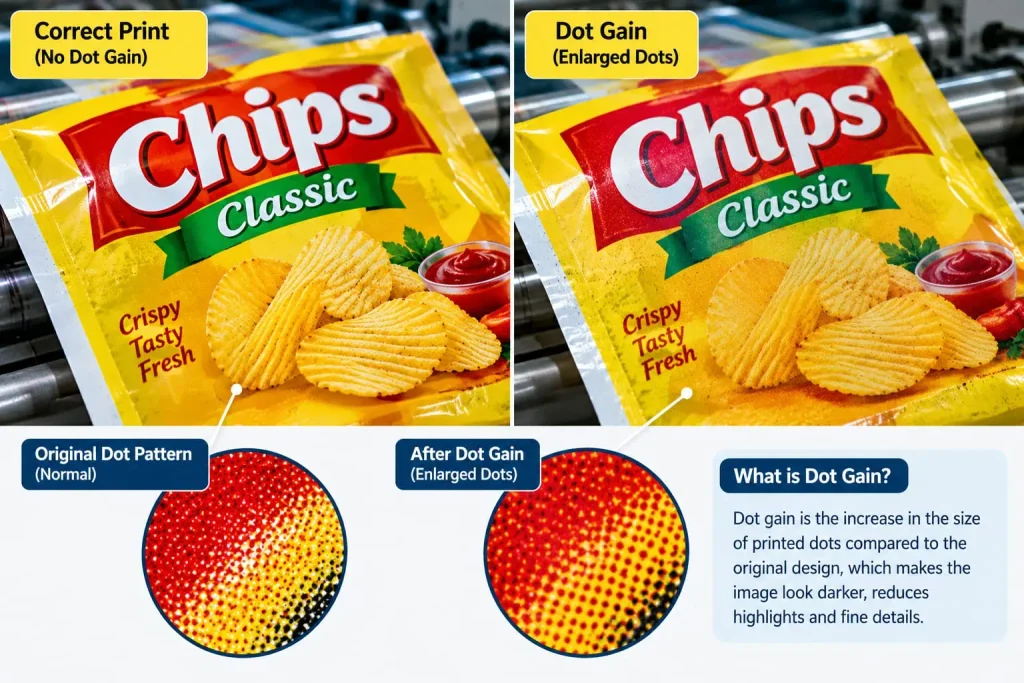
12. Excessive Dot Gain
Causes
Dot gain occurs when printed halftone dots appear larger than intended, making images darker or reducing highlight detail.
Common causes include excessive impression pressure, unsuitable plate mounting tape, plate characteristics, and excessive ink transfer.
Solutions
- Reduce excessive plate-to-substrate pressure.
- Verify the plate and mounting tape specifications.
- Check anilox volume and ink transfer.
- Review prepress compensation and screening.
- Compare the printed result with the approved target.
Dot gain should be controlled through both prepress and press-side adjustments.
Best Practices to Prevent Flexo Printing Defects
Preventing defects is more efficient than correcting them after large quantities of film have been printed. A practical preventive maintenance and quality-control programme should include:
- Pre-production checks: Verify artwork, plates, ink, substrate, and job specifications.
- Ink control: Record viscosity and other relevant parameters at defined intervals.
- Roller maintenance: Clean anilox rollers and inspect doctor blades regularly.
- Process control: Maintain suitable web tension, impression, drying, and machine speed.
- Quality inspection: Check colour, registration, adhesion, and visual defects against approved standards.
- Root-cause analysis: Record defects, corrective actions, and results for future reference.
Conclusion
Flexo printing defects can affect product appearance, production efficiency, and customer satisfaction. Problems such as pinholes, colour variation, poor adhesion, doctor blade lines, and registration errors often have several possible causes.
The most effective approach is to inspect the printed defect, identify the likely source, and change one relevant parameter at a time. Consistent ink control, correct machine settings, regular cleaning, and systematic quality checks can help reduce waste and improve print consistency.
For flexible packaging manufacturers, a structured troubleshooting process is an important part of maintaining reliable flexographic printing quality.
Frequently Asked Questions (FAQs)
What are the most common flexo printing defects?
Common defects include pinholes, colour variation, registration errors, poor ink adhesion, doctor blade lines, ink smudging, ghosting, filling in, and dot gain.
Why does ink smudge in flexo printing?
Ink may smudge because of insufficient drying or curing, excessive ink transfer, unsuitable solvent balance, or machine speed that exceeds the available drying capacity.
How can I prevent colour variation in flexo printing defects?
Maintain consistent ink conditions, monitor viscosity, use spectrophotometric colour checks, inspect anilox rollers, and compare results with approved colour standards.
Why does ink peel off plastic film?
Ink peeling may result from insufficient surface treatment, contamination, incompatible ink, or inadequate drying. Verify the substrate, ink specifications, and adhesion-test results.
How can flexo printing waste be reduced?
Use preventive maintenance, stable process settings, regular quality checks, controlled make-ready procedures, and documented root-cause analysis to reduce avoidable waste.
What are the most common flexo printing defects?
Common defects include pinholes, colour variation, registration errors, poor ink adhesion, doctor blade lines, ink smudging, ghosting, filling in, and dot gain.
Why does ink smudge in flexo printing?
Ink may smudge because of insufficient drying or curing, excessive ink transfer, unsuitable solvent balance, or machine speed that exceeds the available drying capacity.
How can I prevent colour variation in flexo printing?
Maintain consistent ink conditions, monitor viscosity, use spectrophotometric colour checks, inspect anilox rollers, and compare results with approved colour standards.
Why does ink peel off plastic film?
Ink peeling may result from insufficient surface treatment, contamination, incompatible ink, or inadequate drying. Verify the substrate, ink specifications, and adhesion-test results.
How can flexo printing waste be reduced?
Use preventive maintenance, stable process settings, regular quality checks, controlled make-ready procedures, and documented root-cause analysis to reduce avoidable waste.